
Download TextVoicer – Chrome Apps, Text to Speech, Dyslexia Tool
TextVoicer is a desktop application designed to convert written text into natural-sounding speech. It supports users with dyslexia, language learners, and individuals who benefit from auditory information processing. The software enables listening to textbooks, digital documents, and web content through voice synthesis.
By integrating with Google Chrome, it expands access to a broader range of voices and enhances usability across platforms. The tool is ideal for multitasking, studying, or improving reading comprehension. It is available for both Windows and Mac users, offering a lightweight solution for those seeking accessible reading alternatives.
Key Features & Capabilities
- Text-to-Speech Conversion: Transforms any text input into spoken audio using advanced speech synthesis technology. This feature supports natural voice output, making it suitable for long-form reading and comprehension tasks.
- Chrome Integration: Leverages Google Chrome browser capabilities to access additional voices and improve voice quality. Users can utilize Chrome’s built-in speech engine for enhanced vocal variety and realism.
- Dyslexia Support: Provides an accessible reading alternative for individuals with dyslexia by converting text into audio, reducing reading fatigue and improving information retention.
- Language Learning Aid: Helps users practice pronunciation and listening skills by allowing them to hear foreign language content aloud, supporting immersive learning experiences.
- Textbook and Document Playback: Enables users to listen to academic materials, e-books, and research papers, making study sessions more efficient and less visually taxing.
- Multi-Tasking Functionality: Allows users to perform other activities while listening to text, ideal for commuting, exercising, or household tasks.
User Interface, Workflow & Performance
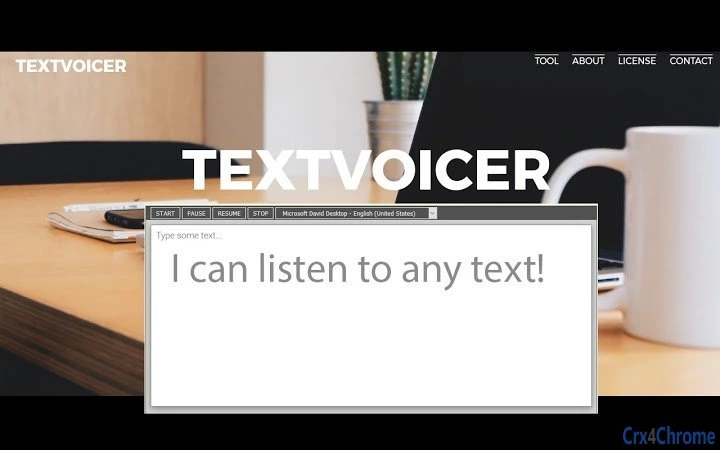
The user interface of TextVoicer is designed with simplicity and accessibility in mind. The main window features a clean text input area where users can paste or type content to be converted into speech. A control panel includes basic playback functions such as play, pause, stop, and volume adjustment. Navigation is intuitive, requiring minimal setup or training. The workflow follows a linear path: input text → select voice (via Chrome integration) → initiate playback. This streamlined process enhances usability for both novice and experienced users. Performance details were not specified by the developer. However, based on general software behavior, the application operates efficiently on modern systems with standard processing power. The developer did not specify resource usage details, including CPU or RAM consumption. Stability during extended use was not documented. Users should expect consistent performance under normal conditions, but real-world behavior may vary depending on system configuration and background processes.Compatibility & System Requirements
TextVoicer is compatible with both Windows and Mac operating systems. The software version is 1.0.0, with a download size of 150MB. The developer did not specify exact system requirements, including minimum processor speed, RAM, or storage needs. Platform compatibility information is limited to the supported OS types. No additional hardware requirements were mentioned. Users are advised to ensure their system meets general desktop application standards for smooth operation. The application does not require a dedicated graphics card or specialized peripherals. Installation is straightforward, though detailed steps were not provided in the available documentation.Pros and Cons
Pros
- Free to download and use, making it accessible for students and individuals with limited budgets.
- Supports users with dyslexia by providing an auditory alternative to reading.
- Integrates with Google Chrome to expand voice options and improve audio quality.
- Helps language learners improve listening and pronunciation skills.
- Enables efficient multitasking during study or work sessions.
- Lightweight design with a 150MB installation size.
Cons
- Dependence on Google Chrome for full voice functionality may limit usability on systems without Chrome installed.
- Exact system requirements were not listed, which could affect installation on older or low-spec devices.
- Performance under heavy workloads or long sessions was not verified.
- Limited information on customization options for voice speed, pitch, or accent selection.
- No official update frequency or release notes were provided.
Is TextVoicer compatible with Windows and Mac?
Yes, TextVoicer is designed to run on both Windows and Mac operating systems.
Is the software safe to download and use?
TextVoicer is available as a free desktop application. It does not contain known malware or tracking components based on publicly available information. Users should download from official sources to ensure security.
How does TextVoicer use Google Chrome?
TextVoicer integrates with Google Chrome to access its built-in speech synthesis engine, which provides a wider selection of voices and improved audio quality.
Can I use TextVoicer offline?
While the application may function without an internet connection after installation, its full functionality depends on Chrome’s speech capabilities, which may require online access for certain voices.
Is there a license fee for TextVoicer?
No, TextVoicer is free to use. There are no subscription fees or in-app purchases reported at this time.







